
سلام ان شا الله که حال دلتون خوب باشه
تصمیم دارم جلسات انتقال تجربه ی خودمو که تو دانشگاه در قالب ۱۰ جلسه به صورت پروژه های کوچیک قرار بود انجام بدم رو اینجا هم بزارم تا شاید کمکی کرده باشم. قراره از کارای خیلی ساده شروع کنم و به یه سطح معمولی برسیم.
این پروژه خیلی ساده و کوچیکه. ۴ تا عمل اصلی رو داره ولی قراره یه ماشین حساب خوشگل تر هم درست کنیم. پس اینو میزارم اینجا تا چند روز بعد یه ماشین حساب خوشگل تر هم بهش اضافه بشه.
تصمیم دارم جلسات انتقال تجربه ی خودمو که تو دانشگاه در قالب ۱۰ جلسه به صورت پروژه های کوچیک قرار بود انجام بدم رو اینجا هم بزارم تا شاید کمکی کرده باشم. قراره از کارای خیلی ساده شروع کنم و به یه سطح معمولی برسیم
در ضمن میتونین سورس کد رو از گیت هاب بگیرین
https://github.com/mehdii08/MySimpleCalculator
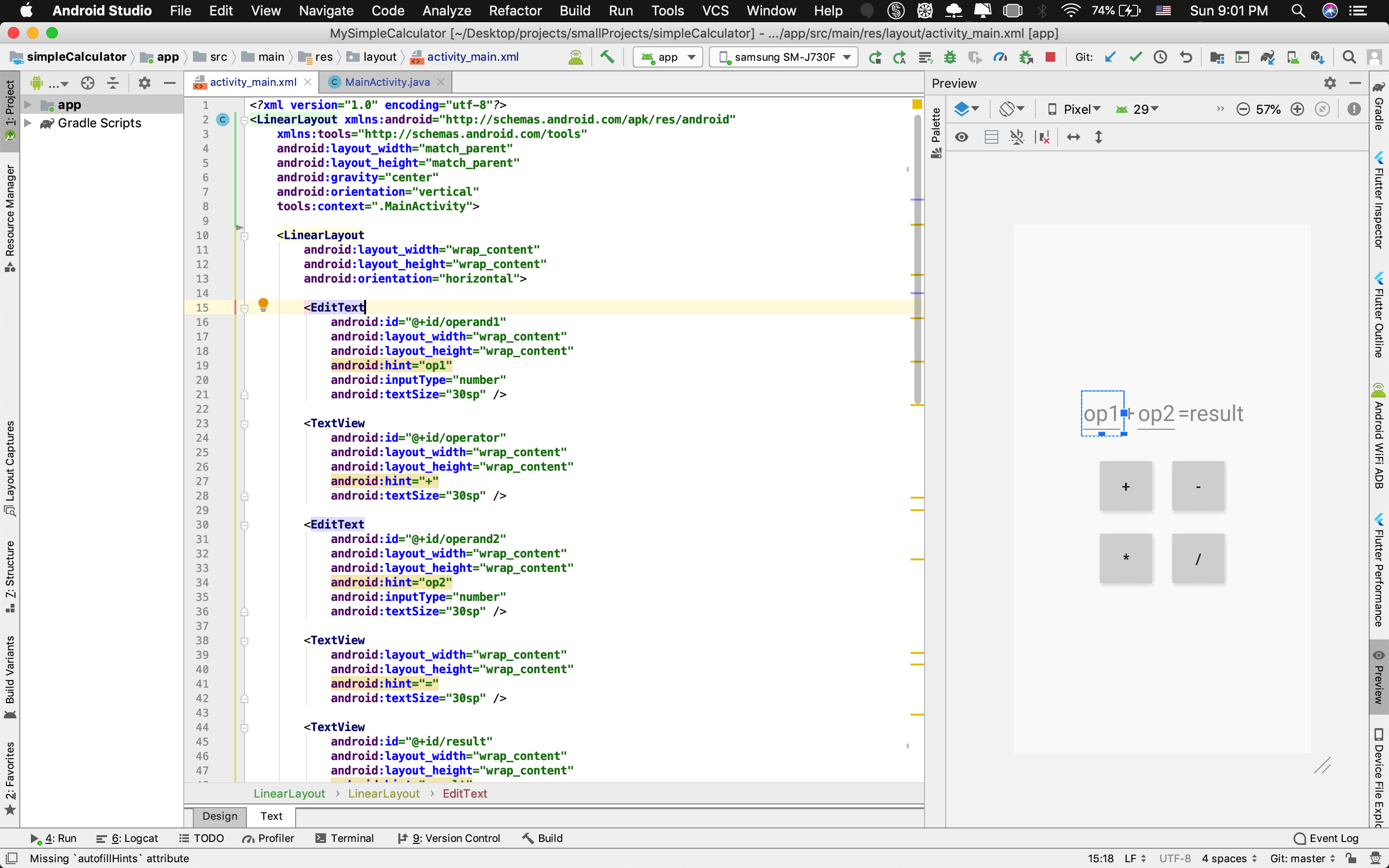
فایل اول activity_main.xml هست:
<?xml version="1.0" encoding="utf-8"?> <LinearLayout xmlns:android="http://schemas.android.com/apk/res/android" xmlns:tools="http://schemas.android.com/tools" android:layout_width="match_parent" android:layout_height="match_parent" android:gravity="center" android:orientation="vertical" tools:context=".MainActivity"> <LinearLayout android:layout_width="wrap_content" android:layout_height="wrap_content" android:orientation="horizontal"> <EditText android:id="@+id/operand1" android:layout_width="wrap_content" android:layout_height="wrap_content" android:hint="op1" android:inputType="number" android:textSize="30sp" /> <TextView android:id="@+id/operator" android:layout_width="wrap_content" android:layout_height="wrap_content" android:hint="+" android:textSize="30sp" /> <EditText android:id="@+id/operand2" android:layout_width="wrap_content" android:layout_height="wrap_content" android:hint="op2" android:inputType="number" android:textSize="30sp" /> <TextView android:layout_width="wrap_content" android:layout_height="wrap_content" android:hint="=" android:textSize="30sp" /> <TextView android:id="@+id/result" android:layout_width="wrap_content" android:layout_height="wrap_content" android:hint="result" android:textSize="30sp" /> </LinearLayout> <LinearLayout android:layout_width="wrap_content" android:layout_height="wrap_content" android:layout_marginTop="30sp" android:orientation="horizontal"> <androidx.appcompat.widget.AppCompatButton android:id="@+id/sum" android:layout_width="80sp" android:layout_height="80sp" android:layout_marginRight="20sp" android:="sum" android:text="+" android:textSize="20sp" /> <androidx.appcompat.widget.AppCompatButton android:id="@+id/subtraction" android:layout_width="80sp" android:layout_height="80sp" android:="subtraction" android:text="-" android:textSize="20sp" /> </LinearLayout> <LinearLayout android:layout_width="wrap_content" android:layout_height="wrap_content" android:layout_marginTop="20sp" android:orientation="horizontal"> <androidx.appcompat.widget.AppCompatButton android:id="@+id/multiplication" android:layout_width="80sp" android:layout_height="80sp" android:layout_marginRight="20sp" android:="multiplication" android:text="*" android:textSize="20sp" /> <androidx.appcompat.widget.AppCompatButton android:id="@+id/division" android:layout_width="80sp" android:layout_height="80sp" android:="division" android:text="/" android:textSize="20sp" /> </LinearLayout> </LinearLayout>
فایل بعدی MainActivity.java هست:
import androidx.appcompat.app.AppCompatActivity;
import androidx.appcompat.widget.AppCompatButton;

import android.media.Image;
import android.os.Bundle;
import android.view.View;
import android.widget.EditText;
import android.widget.ImageView;
import android.widget.TextView;
import android.widget.Toast;

public class MainActivity extends AppCompatActivity {

    private EditText operand1, operand2;
    private TextView operator, result;

    @Override
    protected void onCreate(Bundle savedInstanceState) {
        super.onCreate(savedInstanceState);
        setContentView(R.layout.activity_main);

        init();

    }

    private void init() {

        operand1 = findViewById(R.id.operand1);
        operand2 = findViewById(R.id.operand2);
        operator = findViewById(R.id.operator);
        result = findViewById(R.id.result);

    }

    public void sum(View view) {

        if (operand1.getText().toString().isEmpty()) {

            Toast.makeText(this, "op1 is empty", Toast.LENGTH_SHORT).show();

        } else if (operand2.getText().toString().isEmpty()) {

            Toast.makeText(this, "op2 is empty", Toast.LENGTH_SHORT).show();

        } else {

            int a = Integer.parseInt(operand1.getText().toString());
            int b = Integer.parseInt(operand2.getText().toString());
            int result = a + b;

            this.operator.setText("+");
            this.result.setText(String.valueOf(result));

        }

    }

    public void subtraction(View view) {

        if (operand1.getText().toString().isEmpty()) {

            Toast.makeText(this, "op1 is empty", Toast.LENGTH_SHORT).show();

        } else if (operand2.getText().toString().isEmpty()) {

            Toast.makeText(this, "op2 is empty", Toast.LENGTH_SHORT).show();

        } else {

            int a = Integer.parseInt(operand1.getText().toString());
            int b = Integer.parseInt(operand2.getText().toString());
            int result = a - b;

            this.operator.setText("-");
            this.result.setText(String.valueOf(result));

        }

    }

    public void multiplication(View view) {

        if (operand1.getText().toString().isEmpty()) {

            Toast.makeText(this, "op1 is empty", Toast.LENGTH_SHORT).show();

        } else if (operand2.getText().toString().isEmpty()) {

            Toast.makeText(this, "op2 is empty", Toast.LENGTH_SHORT).show();

        } else {

            int a = Integer.parseInt(operand1.getText().toString());
            int b = Integer.parseInt(operand2.getText().toString());
            int result = a * b;

            this.operator.setText("*");
            this.result.setText(String.valueOf(result));

        }

    }

    public void division(View view) {

        if (operand1.getText().toString().isEmpty()) {

            Toast.makeText(this, "op1 is empty", Toast.LENGTH_SHORT).show();

        } else if (operand2.getText().toString().isEmpty()) {

            Toast.makeText(this, "op2 is empty", Toast.LENGTH_SHORT).show();

        } else if (Integer.parseInt(operand2.getText().toString()) == 0) {

            Toast.makeText(this, "division by zero", Toast.LENGTH_SHORT).show();

        } else {

            int a = Integer.parseInt(operand1.getText().toString());
            int b = Integer.parseInt(operand2.getText().toString());
            int result = a / b;

            this.operator.setText("/");
            this.result.setText(String.valueOf(result));

        }

    }

}
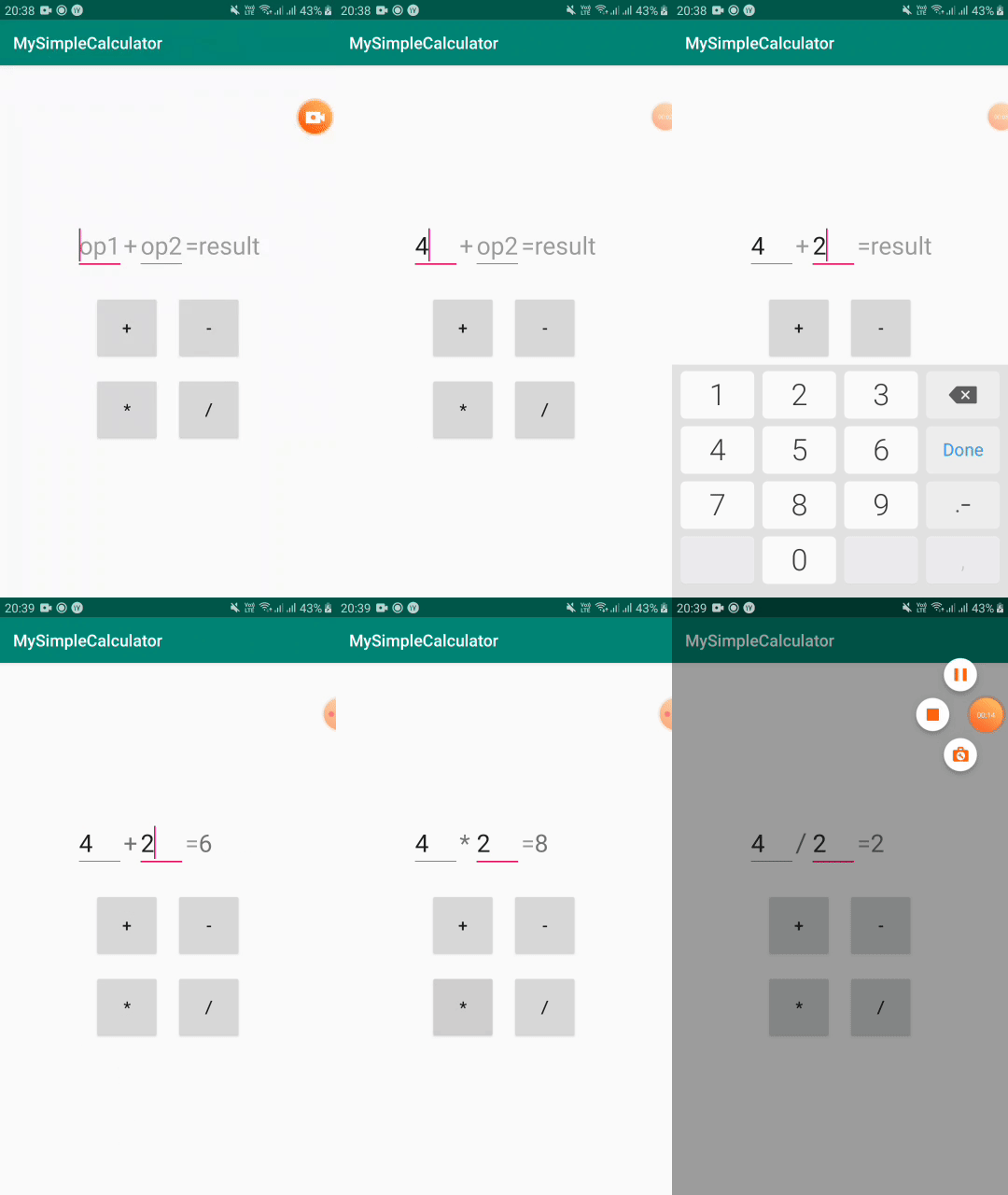
خب حالا میتونین اجراش کنین. خروجی مثل تصویر پایین میشه
میدونم خیلی سادس ولی این برای اون دوستانی هست که دفعات اولشونه با اندروید استودیو کار میکنن. ان شا الله تو پستای بعدی پروژه های پیچیده تری رو هم با هم کار میکنیم.

