
روبیکا من : https://rubika.ir/artinkarimian3 سایت من : https://sites.google.com/view/artin-karimian
پروژه هفتم پایتون : ماشین حساب
خب وسایل لازم برای ساخت این پروژه :
1- پایتون
2-کتابخانه tkinter
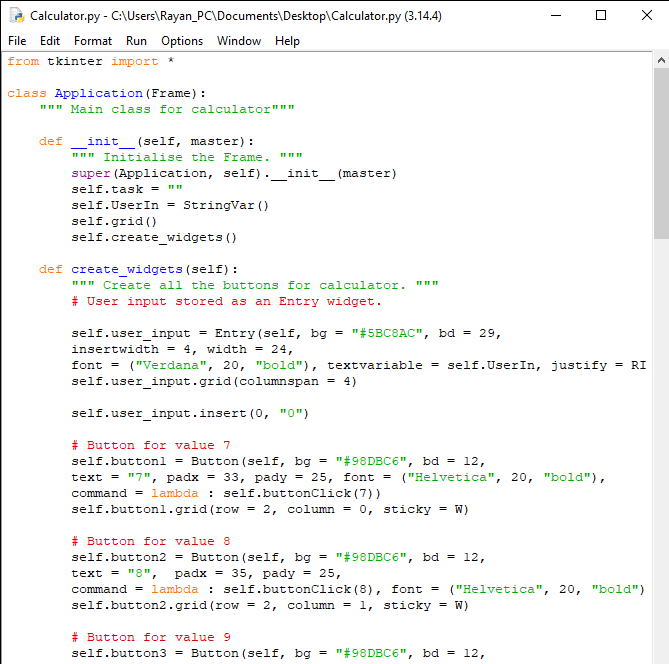
خب حالا کد زیر را داخل پایتون وارد میکنیم .
from tkinter import *

class Application(Frame):
    """ Main class for calculator"""

    def __init__(self, master):
        """ Initialise the Frame. """
        super(Application, self).__init__(master)
        self.task = ""
        self.UserIn = StringVar()
        self.grid()
        self.create_widgets()

    def create_widgets(self):
        """ Create all the buttons for calculator. """
        # User input stored as an Entry widget.

        self.user_input = Entry(self, bg = "#5BC8AC", bd = 29,
        insertwidth = 4, width = 24,
        font = ("Verdana", 20, "bold"), textvariable = self.UserIn, justify = RIGHT)
        self.user_input.grid(columnspan = 4)

        self.user_input.insert(0, "0")

        # Button for value 7
        self.button1 = Button(self, bg = "#98DBC6", bd = 12,
        text = "7", padx = 33, pady = 25, font = ("Helvetica", 20, "bold"),
        command = lambda : self.buttonClick(7))
        self.button1.grid(row = 2, column = 0, sticky = W)

        # Button for value 8
        self.button2 = Button(self, bg = "#98DBC6", bd = 12,
        text = "8",  padx = 35, pady = 25,
        command = lambda : self.buttonClick(8), font = ("Helvetica", 20, "bold"))
        self.button2.grid(row = 2, column = 1, sticky = W)

        # Button for value 9
        self.button3 = Button(self, bg = "#98DBC6", bd = 12,
        text = "9",  padx = 33, pady = 25,
        command = lambda : self.buttonClick(9), font = ("Helvetica", 20, "bold"))
        self.button3.grid(row = 2, column = 2, sticky = W)

        # Button for value 4
        self.button4 = Button(self, bg = "#98DBC6", bd = 12,
        text = "4",  padx = 33, pady = 25,
        command = lambda : self.buttonClick(4), font = ("Helvetica", 20, "bold"))
        self.button4.grid(row = 3, column = 0, sticky = W)

        # Button for value 5
        self.button5 = Button(self, bg = "#98DBC6", bd = 12,
        text = "5",  padx = 35, pady = 25,
        command = lambda : self.buttonClick(5), font = ("Helvetica", 20, "bold"))
        self.button5.grid(row = 3, column = 1, sticky = W)

        # Button for value 6
        self.button6 = Button(self, bg = "#98DBC6", bd = 12,
        text = "6",  padx = 33, pady = 25,
        command = lambda : self.buttonClick(6), font = ("Helvetica", 20, "bold"))
        self.button6.grid(row = 3, column = 2, sticky = W)

        # Button for value 1
        self.button7 = Button(self, bg = "#98DBC6", bd = 12,
        text = "1",  padx = 33, pady = 25,
        command = lambda : self.buttonClick(1), font = ("Helvetica", 20, "bold"))
        self.button7.grid(row = 4, column = 0, sticky = W)

        # Button for value 2
        self.button8 = Button(self, bg = "#98DBC6", bd = 12,
        text = "2",  padx = 35, pady = 25,
        command = lambda : self.buttonClick(2), font = ("Helvetica", 20, "bold"))
        self.button8.grid(row = 4, column = 1, sticky = W)

        # Button for value 3
        self.button9 = Button(self, bg = "#98DBC6", bd = 12,
        text = "3",  padx = 33, pady = 25,
        command = lambda : self.buttonClick(3), font = ("Helvetica", 20, "bold"))
        self.button9.grid(row = 4, column = 2, sticky = W)

        # Button for value 0
        self.button9 = Button(self, bg = "#98DBC6", bd = 12,
        text = "0",  padx = 33, pady = 25,
        command = lambda : self.buttonClick(0), font = ("Helvetica", 20, "bold"))
        self.button9.grid(row = 5, column = 0, sticky = W)

        # Operator buttons
        # Addition button
        self.Addbutton = Button(self, bg = "#98DBC6", bd = 12,
        text = "+",  padx = 36, pady = 25,
        command = lambda : self.buttonClick("+"), font = ("Helvetica", 20, "bold"))
        self.Addbutton.grid(row = 2, column = 3, sticky = W)

        # Subtraction button
        self.Subbutton = Button(self, bg = "#98DBC6", bd = 12,
        text = "-",  padx = 39, pady = 25,
        command = lambda : self.buttonClick("-"), font = ("Helvetica", 20, "bold"))
        self.Subbutton.grid(row = 3, column = 3, sticky = W)

        # Multiplication button
        self.Multbutton = Button(self, bg = "#98DBC6", bd = 12,
        text = "*",  padx = 38, pady = 25,
        command = lambda : self.buttonClick("*"), font = ("Helvetica", 20, "bold"))
        self.Multbutton.grid(row = 4, column = 3, sticky = W)

        # Division button
        self.Divbutton = Button(self, bg = "#98DBC6", bd = 12,
        text = "/",  padx = 39, pady = 25,
        command = lambda : self.buttonClick("/"), font = ("Helvetica", 20, "bold"))
        self.Divbutton.grid(row = 5, column = 3, sticky = W)

        # Equal button
        self.Equalbutton = Button(self, bg = "#E6D72A", bd = 12,
        text = "=",  padx = 100, pady = 25,
        command = self.CalculateTask, font = ("Helvetica", 20, "bold"))
        self.Equalbutton.grid(row = 5, column = 1, sticky = W, columnspan = 2)

        # Clear Button
        self.Clearbutton = Button(self, bg = "#E6D72A", bd = 12,
        text = "AC", font = ("Helvetica", 20, "bold"), width = 28, padx = 7, command = self.ClearDisplay)
        self.Clearbutton.grid(row = 1, columnspan = 4, sticky = W)

    def buttonClick(self, number):
        self.task = str(self.task) + str(number)
        self.UserIn.set(self.task)

    def CalculateTask(self):
        self.data = self.user_input.get()
        try:
            self.answer = eval(self.data)
            self.displayText(self.answer)
            self.task = self.answer

        except SyntaxError as e:
            self.displayText("Invalid Syntax!")
            self.task = ""

    def displayText(self, value):
        self.user_input.delete(0, END)
        self.user_input.insert(0, value)

    def ClearDisplay(self):
        self.task = ""
        self.user_input.delete(0, END)
        self.user_input.insert(0, "0")


calculator = Tk()

calculator.title("Calculator")
app = Application(calculator)
# Make window fixed (cannot be resized)
calculator.resizable(width = False, height = False)

calculator.mainloop()
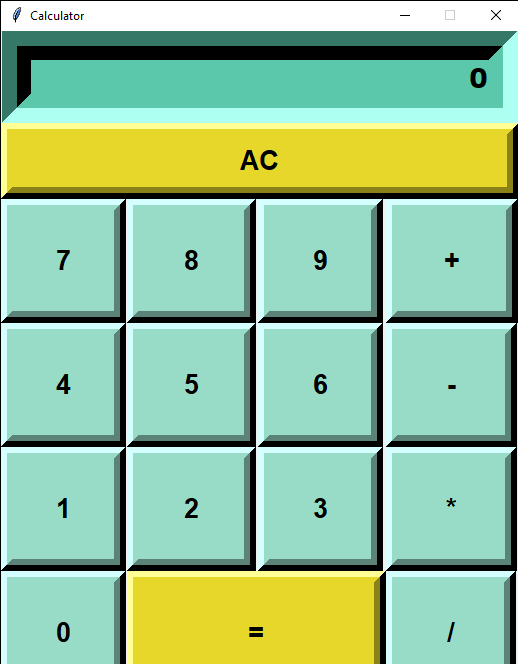
وقتی کد را وارد کنید برنامه زیر را میبینید .
برای دانلود همین پایتون یا فایل تبدیل شده به برنامه روی نوشته لینک بزنید و 15ثانیه صبر کنید و فایل را دریافت کنید .
خب حالا اینم از ماشین حساب اگر ایده یا پروژه ای را دارید در نظرات بنویسید .
مطلبی دیگر از این انتشارات
پروژه اول با پایتون : ردیابی شماره موبایل
مطلبی دیگر از این انتشارات
پروژه هشتم پایتون : استخراج لینک از وب
مطلبی دیگر از این انتشارات
پروژه دوم پایتون : ساعت جهانی