

محمد دادخواه / یک برنامه نویس / بالاخره شدیم مهندس کامپیوتر?
آموزش ساخت محاسبه گر شاخص توده بدنی BMI
در این آموزش می خواهیم نحوه ایجاد یک ماشین حساب شاخص توده بدنی (BMI) آموزش ببینیم.
این آموزش مناسب مبتدیانی است که می خواهند نحوه ایجاد این ماشین حساب را بررسی کنند.

شاخص توده بدنی یا (BMI (Body Mass Index مقداری است که از وزن و قد یک فرد حاصل می شود.
شاخص توده بدنی= kg/m^2
قدم اول:تعریف چیدمان

قدم اول تعریف یک چیدمان مناسب است که به کاربر امکان می دهد مقادیر قد و وزن را وارد کند تا شاخص توده بدنی محاسبه شود.
علاوه بر این ما به یک دکمه برای شروع محاسبه شاخص توده بدنی و همچنین یک TextView برای نمایش نتیجه نیاز خواهیم داشت.
پس در کل به موارد زیر نیاز داریم:
- دو EditText
- یک Button
- یک TextView
چیدمان اپلیکیشن ما به صورت زیر خواهد بود:
<?xml version="1.0" encoding="utf-8"?>
<LinearLayout xmlns:android="http://schemas.android.com/apk/res/android"
xmlns:tools="http://schemas.android.com/tools"
android:id="@+id/activity_main"
android:layout_width="match_parent"
android:layout_height="match_parent"
android:paddingBottom="@dimen/activity_vertical_margin"
android:paddingLeft="@dimen/activity_horizontal_margin"
android:paddingRight="@dimen/activity_horizontal_margin"
android:paddingTop="@dimen/activity_vertical_margin"
android:orientation="vertical"
tools:context="com.ssaurel.bmicalculator.MainActivity">
<TextView
android:text="@string/weight"
android:layout_width="wrap_content"
android:layout_height="wrap_content"
android:layout_gravity="center_horizontal"
android:gravity="center_horizontal"
android:layout_marginTop="50dp"
android:textSize="20sp"/>
<EditText
android:id="@+id/weight"
android:layout_width="wrap_content"
android:layout_height="wrap_content"
android:layout_gravity="center_horizontal"
android:layout_marginTop="10dp"
android:ems="6"
android:inputType="number|numberDecimal"
android:textSize="20sp"/>
<TextView
android:text="@string/height"
android:layout_width="wrap_content"
android:layout_height="wrap_content"
android:layout_gravity="center_horizontal"
android:gravity="center_horizontal"
android:layout_marginTop="50dp"
android:textSize="20sp"/>
<EditText
android:id="@+id/height"
android:layout_width="wrap_content"
android:layout_height="wrap_content"
android:layout_gravity="center_horizontal"
android:layout_marginTop="10dp"
android:ems="6"
android:inputType="number|numberDecimal"
android:textSize="20sp"/>
<Button
android:id="@+id/calc"
android:layout_width="wrap_content"
android:layout_height="wrap_content"
android:layout_gravity="center_horizontal"
android:layout_marginTop="25dp"
android:="calculateBMI"
android:text="@string/calculateBMI"
/>
<TextView
android:id="@+id/result"
android:layout_width="wrap_content"
android:layout_height="wrap_content"
android:layout_gravity="center_horizontal"
android:gravity="center_horizontal"
android:layout_marginTop="25dp"
android:textSize="20sp"/>
</LinearLayout>قدم دوم:نوشتن کد Java

اکنون می توانیم کد جاوا را در Main Activity تایپ کنیم.
کد جاوا اپلیکیشن ما به صورت زیر خواهد بود:
package com.ssaurel.bmicalculator;
import android.os.Bundle;
import android.support.v7.app.AppCompatActivity;
import android.view.View;
import android.widget.EditText;
import android.widget.TextView;
public class MainActivity extends AppCompatActivity {
private EditText height;
private EditText weight;
private TextView result;
@Override
protected void onCreate(Bundle savedInstanceState) {
super.onCreate(savedInstanceState);
setContentView(R.layout.activity_main);
height = (EditText) findViewById(R.id.height);
weight = (EditText) findViewById(R.id.weight);
result = (TextView) findViewById(R.id.result);
}
public void calculateBMI(View v) {
String heightStr = height.getText().toString();
String weightStr = weight.getText().toString();
if (heightStr != null && !"".equals(heightStr)
&& weightStr != null && !"".equals(weightStr)) {
float heightValue = Float.parseFloat(heightStr) / 100;
float weightValue = Float.parseFloat(weightStr);
float bmi = weightValue / (heightValue * heightValue);
displayBMI(bmi);
}
}
private void displayBMI(float bmi) {
String bmiLabel = ""
if (Float.compare(bmi, 15f) <= 0) {
bmiLabel = getString(R.string.very_severely_underweight);
} else if (Float.compare(bmi, 15f) > 0 && Float.compare(bmi, 16f) <= 0) {
bmiLabel = getString(R.string.severely_underweight);
} else if (Float.compare(bmi, 16f) > 0 && Float.compare(bmi, 18.5f) <= 0) {
bmiLabel = getString(R.string.underweight);
} else if (Float.compare(bmi, 18.5f) > 0 && Float.compare(bmi, 25f) <= 0) {
bmiLabel = getString(R.string.normal);
} else if (Float.compare(bmi, 25f) > 0 && Float.compare(bmi, 30f) <= 0) {
bmiLabel = getString(R.string.overweight);
} else if (Float.compare(bmi, 30f) > 0 && Float.compare(bmi, 35f) <= 0) {
bmiLabel = getString(R.string.obese_class_i);
} else if (Float.compare(bmi, 35f) > 0 && Float.compare(bmi, 40f) <= 0) {
bmiLabel = getString(R.string.obese_class_ii);
} else {
bmiLabel = getString(R.string.obese_class_iii);
}
bmiLabel = bmi + "\n\n" + bmiLabel;
result.setText(bmiLabel);
}
}ما مقادیر وارد شده توسط کاربر را برای وزن و قد دریافت می کنیم. قد به سانتی متر وارد می شود. برای فرمول باید قد را به متر داشته باشیم. بنابراین ، مقدار وارد شده را به 100 تقسیم می کنیم. سپس اعداد را برای محاسبه BMI اعمال می کنیم:
float bmi = weightValue / (heightValue * heightValue);برای تشخیص نتایج از جدول زیر استفاده میکنیم:
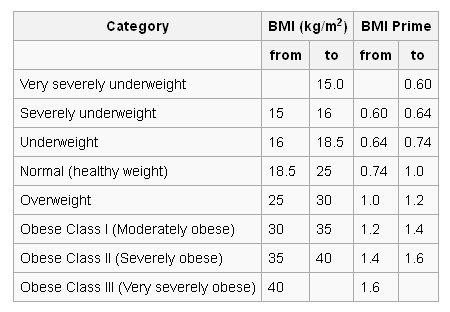
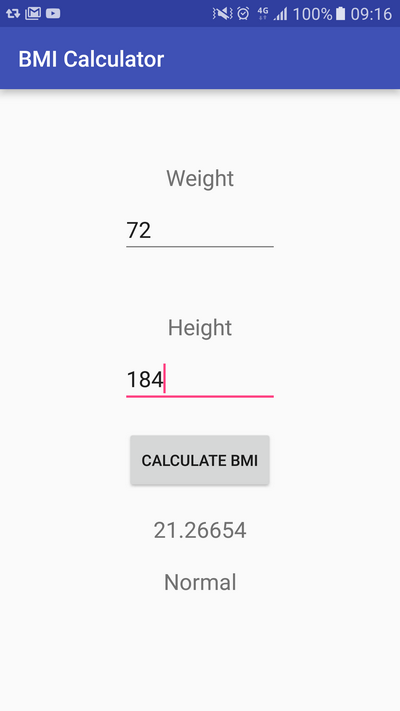
بعد از آن فقط مقدار BMI همراه با نتیجه در TextView نمایش داده خواهد شد:
Writer : MD_CODER
منبع: سایت محمد دادخواه
مطلبی دیگر از این انتشارات
قسمت اول: آموزش پایتون (نصب پایتون و نوشتن اولین کد)
مطلبی دیگر از این انتشارات
معرفی ویژگی های زبان کاتلین برای تازه کار ها
مطلبی دیگر از این انتشارات
چند مورد از بهترین کتابخانه های اندروید